Order Confirmation
Confirm customer orders and initiate the sales process in Prosessed AI.
Overview
Order Confirmation is the process of validating and accepting a customer’s order.
In Prosessed AI, this is typically done through a Sales Order, which acts as:
- Official confirmation of the order
- Agreement between customer and business
- Starting point for fulfillment and billing
What is Order Confirmation?
Order confirmation means:
- Customer has agreed to pricing and terms
- Business has accepted the order
- Order is ready for processing
👉 In ERP systems, this is represented by a Sales Order :contentReference[oaicite:0]{index=0}
When Does Order Confirmation Happen?
Order confirmation happens after:
- Quotation is shared with customer
- Customer approves / sends purchase order
- Business creates and submits Sales Order
Order Confirmation Flow
Quotation → Customer Approval → Sales Order → Delivery → Invoice
- Once Sales Order is created, the order is considered confirmed
- Stock can be reserved for fulfillment
How to Confirm an Order
Method 1: From Quotation (Recommended)
- Open Quotation
- Click Create → Sales Order
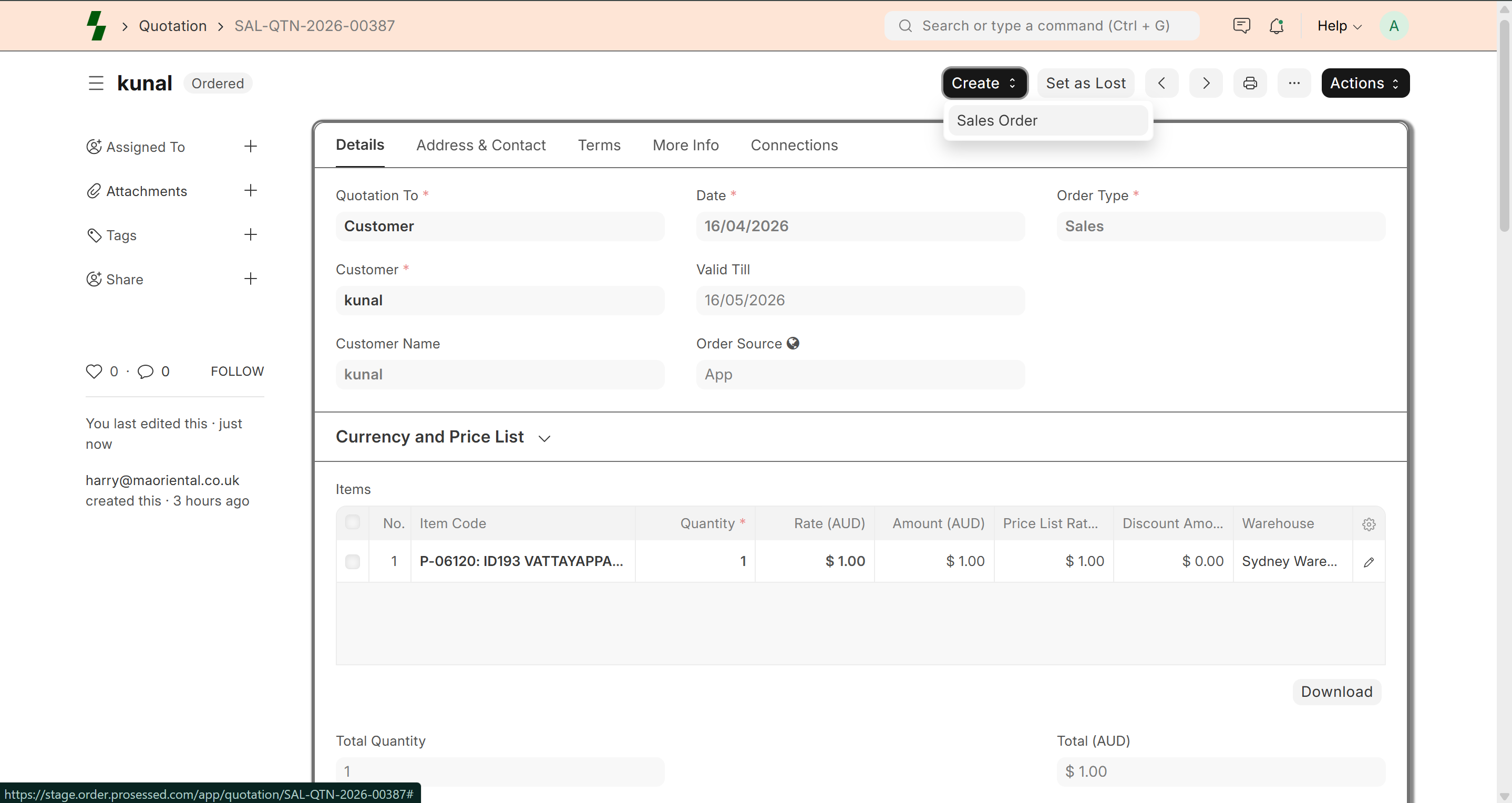 3. Review:
- Customer
- Items
- Pricing
- Click Submit
👉 Order is now confirmed
Method 2: Direct Sales Order
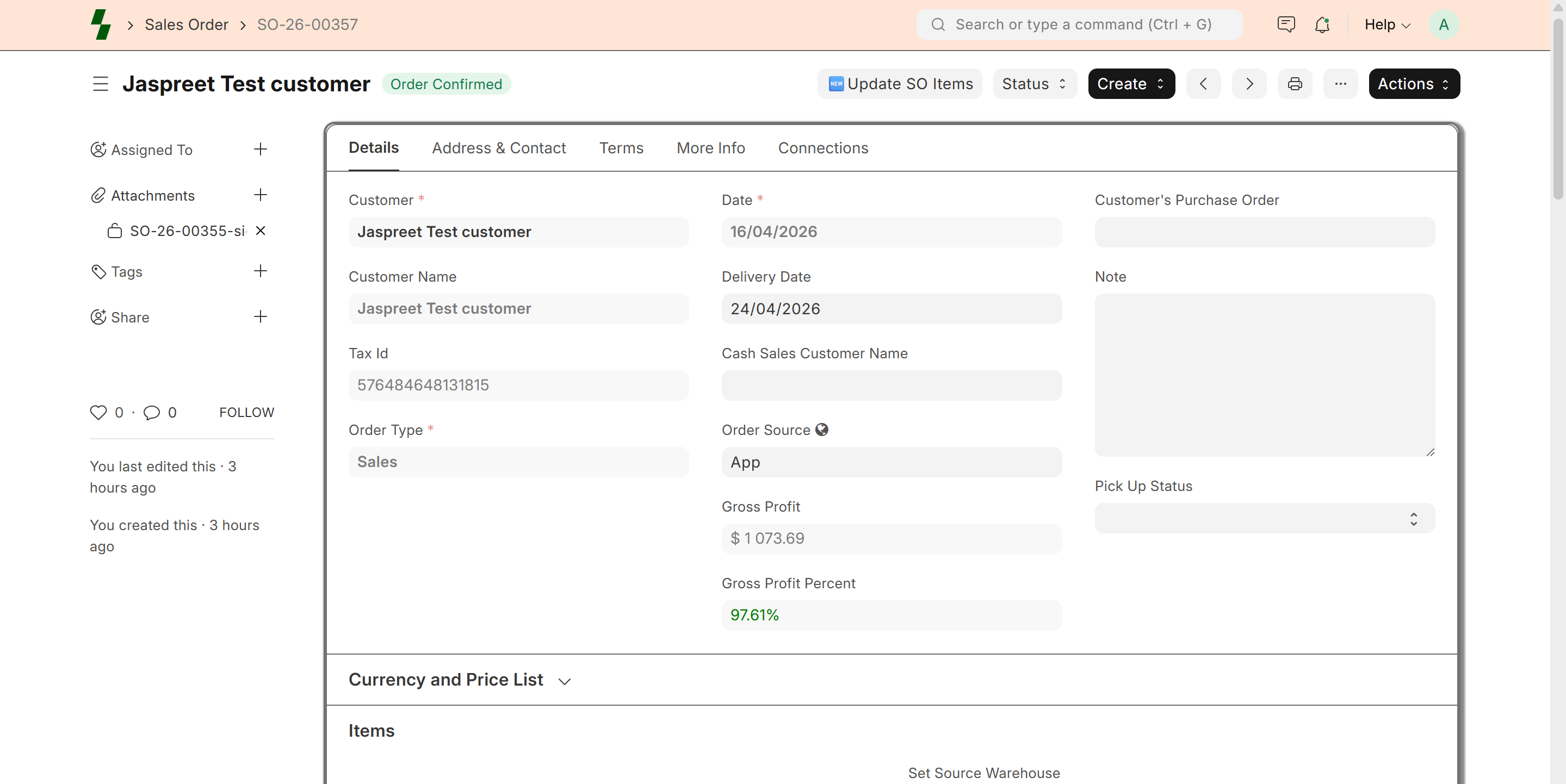
- Go to Sales → Sales Order
- Click Add New
- Enter:
- Customer
- Items
- Quantity
- Price
- Click Submit
What Happens After Confirmation?
Once order is confirmed:
- Stock is reserved for the order
- Order status becomes To Deliver / To Bill
- Order moves to fulfillment stage
👉 Sales Order ensures items are allocated from inventory :contentReference[oaicite:1]{index=1}
Key Information in Order Confirmation
A confirmed order includes:
- Customer details
- Item details and quantity
- Pricing and discounts
- Delivery date
- Payment terms
Order Status After Confirmation
- Draft → Not confirmed
- Submitted → Confirmed
- To Deliver → Pending shipment
- To Bill → Pending invoice
- Completed → Fully processed
Notifications (Optional)
You can enable notifications:
- Send confirmation email to customer
- Alert internal team
- Track order updates
Benefits of Order Confirmation
- Clear agreement with customer
- Avoids order disputes
- Ensures stock availability
- Improves operational efficiency
Best Practices
- Always verify pricing before confirming
- Check stock availability
- Confirm delivery timelines
- Avoid editing after submission
Common Issues
- Wrong pricing → Check price list
- Stock not available → Verify inventory
- Order not progressing → Check status
Example
Customer: ABC Traders
Items: Cheese Makhana (10 cartons)
Price: $96/carton
👉 Sales Order submitted → Order Confirmed
Why It Matters
Order confirmation ensures:
- Smooth order processing
- Accurate inventory tracking
- Better customer experience