Payment Entries
Learn how to record and manage payments received from customers and made to suppliers.
Overview
A Payment Entry is used to record the movement of money in your business.
It helps you:
- Track payments received from customers
- Record payments made to suppliers
- Manage outstanding balances
Types of Payment Entries
Receive Payment
Used when you receive money from a customer.
Example:
- Customer pays invoice
Pay Payment
Used when you pay money to a supplier.
Example:
- Payment for purchase
Internal Transfer
Used to transfer money between accounts.
Example:
- Bank to Cash transfer
When to Use Payment Entry?
Create a payment entry when:
- A customer makes a payment
- You need to record a receipt
- You want to settle an invoice
Create a Payment Entry
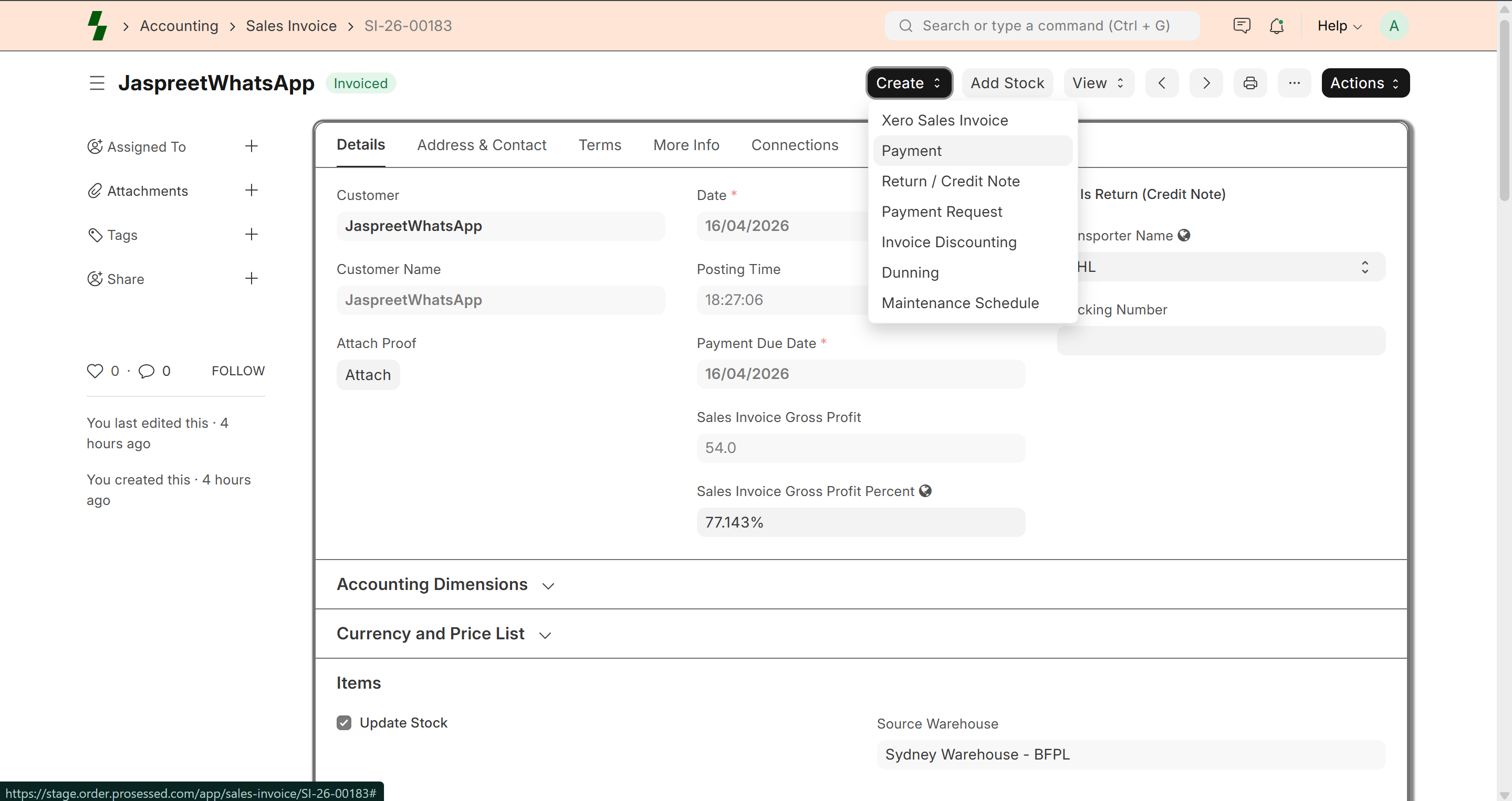
Method 1: From Sales Invoice (Recommended)
- Open Sales Invoice
- Click Create → Payment
- System auto-fills:
- Customer
- Invoice amount
- Outstanding balance
Method 2: Manual Creation
- Go to Accounts → Payment Entry
- Click Add New
Enter Payment Details
Basic Information
- Payment Type (Receive / Pay / Internal Transfer)
- Party Type (Customer / Supplier)
- Party (select customer or supplier)
Payment Accounts
- Paid From (customer account / bank)
- Paid To (your company account)
Amount
- Enter payment amount
- Can be full or partial
Allocate Payment to Invoice
If payment is for an invoice:
- Select the invoice
- Enter allocated amount
System will:
- Reduce outstanding balance
- Update invoice status
Save and Submit
- Click Save
- Click Submit
Payment becomes recorded.
Payment Status
Invoice status updates:
- Unpaid
- Partially Paid
- Paid
Partial Payments
You can receive partial payments.
Example:
- Invoice: $1000
- Payment received: $600
Remaining balance = $400
Refunds
To issue a refund:
- Create payment entry with opposite flow
- Link with credit note if required
Multi-Invoice Payment
You can allocate one payment to multiple invoices.
Best Practices
- Always link payment to invoice
- Verify payment amount before submitting
- Use correct accounts (bank/cash)
- Regularly track outstanding payments
Common Issues
- Payment not reflecting → Check allocation
- Wrong balance → Verify amount entered
- Invoice still unpaid → Check submission
Example
Customer: ABC Traders
Invoice: $1000
Payment Received: $1000
👉 Invoice marked as Paid
What Next?
- Track outstanding → Reports
- Manage invoices → Sales Invoice
- Handle returns → Credit Notes
Last updated 6 months ago